Test commands

This page explains the types of test commands available in Antithesis. Test commands must be placed in test templates.

Many users choose to get started by taking an existing integration test and running it in Antithesis using a singleton driver command.

What’s a test command?

A test command is an executable file that exercises the system under test. It must:

  • Live in a test template, e.g. /opt/antithesis/test/v1/<test_template>/<prefix>_<command>.
  • Have a filename starting with a recognized <prefix>. The <prefix> determines when and how the command runs. <command> can be any valid Unix filename, with any or no extension.
  • Be marked executable by the container’s default user.
  • Be a compiled binary or have a shebang, e.g. #!/usr/bin/env bash, #!/usr/bin/env python3 if it’s a script.

If you’re using an existing script as a test command, you can simply put a symlink in the test directory.

ln /path/to/existingscript /opt/antithesis/test/v1/<test_name>/<prefix>_<command>

Antithesis handles all selection and scheduling of test commands during a run.

Some test commands stop fault injection. See details under each command.

Types of test commands

Antithesis provides 7 types of test commands.

A test template must have at least one of the following test commands:

  • parallel_driver
  • singleton_driver
  • serial_driver
  • anytime

First command

Prefix: first_, e.g. <test_template>/first_<command>

first commands run one-time setup logic. Some test strategies benefit from using a first command to, e.g. create schemas or seed initial test data in a database.

Scheduling rules

  • A first command runs after setup_complete but before any other commands start.
  • If a test template contains any first commands, a first command will run in every execution path using that template.
  • If a test template contains multiple first commands, exactly one is selected per execution path.
  • First commands run to completion before any faults or other commands start.
  • Don’t emit setup_complete from a first command. The first command only runs after setup_complete.

Fault injection

No faults are injected during the execution of a first command.

Concurrency

No other commands run alongside a first command.

Parallel driver command

Prefix: parallel_driver_, e.g. <test_template>/parallel_driver_<command>

parallel_driver commands are the core of most Antithesis tests. Use them for tasks that can run concurrently, like writes, reads, transactions, and API calls.

Scheduling rules
  • parallel_driver commands run at any point after the first command (if any) completes.
  • If the test template doesn’t contain any first commands, parallel_drivercommands can run immediately after setup_complete.
  • Multiple parallel_driver commands can run simultaneously, including multiple copies of the same command.
Fault injection

Faults are injected as normal, including mid-execution.

Concurrency

One or more parallel_driver or anytime commands can run alongside.

Usage

parallel_driver and serial_driver commands are the core of most Antithesis tests and most of your test templates should contain one or more of them.

Serial driver command

Prefix: serial_driver_, e.g. <test_template>/serial_driver_<command>

Use serial_driver commands for operations that cannot run concurrently and need exclusive access to the system. No other commands, except anytime, can run concurrently.

Scheduling rules
  • serial_driver commands can run at any point after the first command (if any) completes.
  • If the test template doesn’t contain any first commands, serial_driver commands can run immediately after setup_complete.
Fault injection

Faults are injected as normal, including mid-execution.

Concurrency

One or more anytime commands can run alongside.

Usage

serial_driver and parallel_driver commands are the core of most Antithesis tests and most of your test templates should contain one or more of them.

Singleton driver command

Prefix: singleton_driver_, e.g. <test_template>/singleton_driver_<command>

Singleton_driver commands only run once on a given timeline. Use them for operations that cannot run concurrently and need exclusive access to the system.

Scheduling rules
  • Singleton_driver commands can run at any point after the first command (if any) completes.
  • If the test template doesn’t contain any first commands, a singleton_driver can run immediately after setup_complete.
  • Exactly one singleton_driver is run per execution path.
Fault injection

Faults are injected as normal, including mid-execution.

Concurrency

One or more anytime commands can run alongside.

Usage
  • Porting an existing integration test to Antithesis.
  • Running a monolithic workload that handles parallelism internally.
  • Quick proof-of-concept testing for new workloads.

Anytime command

Prefix: anytime_, e.g. <test_template>/anytime_<command>

Use anytime commands to check invariants that should always hold, regardless of what else is happening in the system or environment.

Scheduling rules
  • Anytime commands can run at any time after the first command, including during singleton_driver, serial_driver, and parallel_driver execution.
  • An anytime command that’s already running when a finally or eventually command starts will run to completion.
  • New anytime commands will not start while a finally or eventually command is running.
Fault injection

Faults are injected as normal, including mid-execution.

Concurrency

All commands except first commands can run while an anytime is running. Anytime commands will run to completion even if an eventually or finally command starts.

Usage
  • Continuous invariant checks: “a read always reflects the previous write”.
  • Availability monitoring: “it’s possible to make a read without timing out”.

Eventually command

Prefix: eventually_, e.g. <test_template>/eventually_<command>

Eventually commands check system recovery and eventually true invariants. When an eventually command starts, Antithesis kills all other running commands (except anytime commands) and stops all fault injection.

Although faults stop immediately, it can take some time for containers to become operational again. Eventually commands should include retry loops and health checks to ensure the system has time to recover.

Antithesis won’t resume testing on this timeline, so eventually commands can include destructive actions (e.g. drop tables, kill processes).

Eventually and finally commands are often confused. The table below clarifies the differences.

Scheduling rules
  • Eventually commands run only after at least one parallel_driver, serial_driver, or singleton_driver has started.
  • You should not assume eventually commands will run on every timeline.
Fault injection

All faults stop across all containers when an eventually command starts.

Although faults stop immediately, it can take some time for containers to become operational again. eventually commands should include retry loops and health checks to ensure the system has time to recover.

Concurrency

anytime commands that are already running will run to completion. No new commands of any sort will start.

Usage

Eventually commands should be used to check that the system eventually recovers.

  • Verifying eventual properties: availability, consistency, convergence.
  • Checking that the system recovers after faults.
  • Any verification that requires a quiet system (no concurrent writes or faults).

Finally command

Prefix: finally_, e.g. <test_template>/finally_<command>

Finally commands check system recovery and eventually true invariants.

Unlike eventually commands, finally commands only run in timelines where every command started has run to completion and not been killed by a fault or another command.

Although faults stop immediately, it can take some time for containers to become operational again. Finally commands should include retry loops and health checks to ensure the system has time to recover.

Antithesis won’t resume testing on this timeline, so finally commands can include destructive actions (e.g. drop tables, kill processes).

Finally and eventually commands are easily confused. This table clarifies the differences.

Scheduling rules
  • Finally commands run only after at least one parallel_driver, serial_driver, or singleton_driver has run to completion.
  • You should not assume finally commands will run on every timeline.
Fault injection

All faults stop across all containers when a finally command starts.

Although faults stop immediately, it can take some time for containers to become operational again. finally commands should include retry loops and health checks to ensure the system has time to recover.

Concurrency

anytime commands that are already running will run to completion. No new commands of any sort will start.

Usage

Finally commands should be used to check that the final system state is correct.

  • “The database contains exactly N rows” (only meaningful if the commands that wrote them finished).
  • “All expected data is present” (requires drivers to have completed their writes).
  • Final consistency checks that assume a complete workload.

eventually vs. finally

eventually finally
Use case “Does the system recover?” “Is the final state correct?”
When it runs After at least one driver has started. After all started drivers have completed naturally.
How drivers end Killed by Antithesis. Completed on their own.
Faults Stopped. Stopped.
Destructive actions? Yes — branch won’t resume. Yes — branch won’t resume.

Summary

Command type Prefix Faults active? Which commands can run alongside?
first first_ No None.
parallel_driver parallel_driver_ Yes One or more parallel_driver or anytime.
serial_driver serial_driver_ Yes One or more anytime.
singleton_driver singleton_driver_ Yes One or more anytime.
eventually eventually_ No Running anytimes will complete.
finally finally_ No Running anytimes will complete.
anytime anytime_ Yes (during drivers) Any except first.

Here’s an illustration of how the various test commands could be scheduled during a test run.
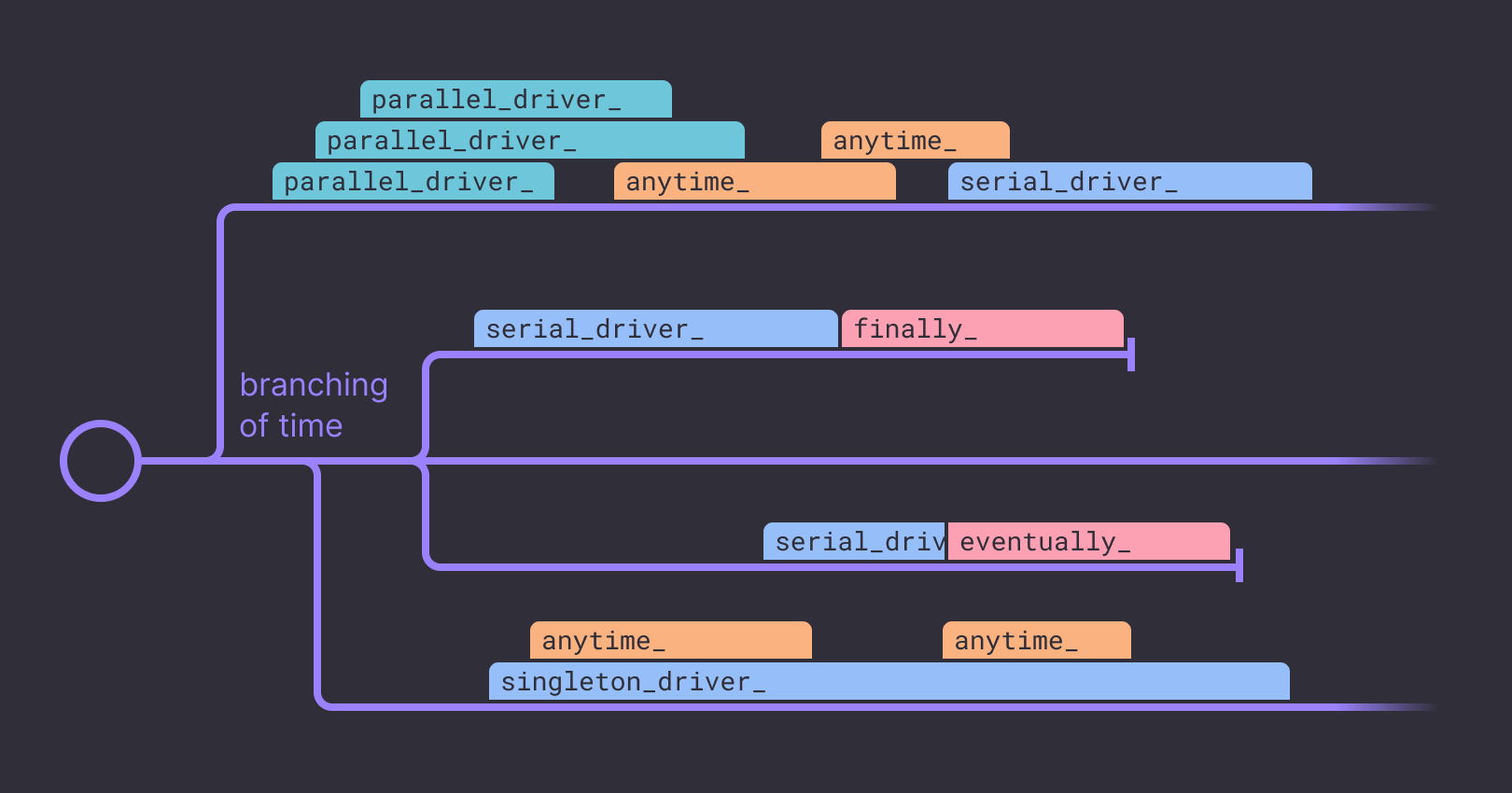
Overview of test command scheduling in a test run

Further reading

For a more detailed explanation of the concepts underpinning the test templates, see best practices for autonomous testing.

For guidance on how to test each of these commands locally before deploying to Antithesis, see checking test templates locally.

For an example of how to convert an existing integration test into a test template, check out this example, using Turso’s actual test setup.

  • Introduction
  • How Antithesis works
  • Using Antithesis with AI
  • Get started
  • Test an example system
  • With Docker Compose
  • Build and run an etcd cluster
  • Add a test template
  • With Kubernetes
  • Build and run an etcd cluster
  • Add a test template
  • Setup guide
  • For Docker Compose users
  • For Kubernetes users
  • Product
  • Test templates
  • Creating test templates
  • Test commands
  • How to check a test template locally
  • How to port tests to Antithesis
  • Test launchers
  • Reports
  • The triage reports
  • Findings
  • Environment
  • Utilization
  • Properties
  • The bug reports
  • Context, Instance, & Logs
  • Bug likelihood over time
  • Logs Explorer & multiverse map
  • Debugging
  • Multiverse debugging
  • Advanced mode
  • The Antithesis multiverse
  • Querying with event sets
  • Environment utilities
  • Using the Antithesis Notebook
  • Cookbook
  • Tooling integrations
  • CI integration
  • Discord and Slack integrations
  • Issue tracker integration - BETA
  • Configuration
  • Access and authentication
  • The Antithesis environment
  • Best practices
  • Docker best practices
  • Kubernetes best practices
  • Optimizing for testing
  • Concepts
  • Properties and Assertions
  • Properties in Antithesis
  • Assertions in Antithesis
  • Sometimes Assertions
  • Properties to test for
  • Fault injection
  • Reference
  • Webhooks
  • Launching a test
  • Launching a debugging session
  • Webhook parameters
  • SDK reference
  • Define test properties
  • Generate randomness
  • Manage test lifecycle
  • Assertion catalog
  • Coverage instrumentation
  • Go
  • Instrumentor
  • Tutorial
  • Assert (reference)
  • Lifecycle (reference)
  • Random (reference)
  • Java
  • Using the SDK
  • Building your software
  • Tutorial
  • Assert (reference)
  • Lifecycle (reference)
  • Random (reference)
  • C
  • C++
  • C/C++ Instrumentation
  • Tutorial
  • Assert (reference)
  • Lifecycle (reference)
  • Random (reference)
  • JavaScript
  • Python
  • Tutorial
  • Assert (reference)
  • Lifecycle (reference)
  • Random (reference)
  • Rust
  • Instrumentation
  • Tutorial
  • Assert (reference)
  • Lifecycle (reference)
  • Random (reference)
  • .NET
  • Instrumentation
  • Tutorial
  • Assert (reference)
  • Lifecycle (reference)
  • Random (reference)
  • Languages not listed above
  • Assert (reference)
  • Lifecycle (reference)
  • Assertion Schema
  • Handling external dependencies
  • FAQ
  • Product FAQs
  • About Antithesis POCs
  • Release notes
  • Release notes
  • General reliability resources
  • Reliability glossary
  • Techniques for better software testing
  • Autonomous testing
  • Deterministic simulation testing
  • Property-based testing
  • White paper — How much does an outage cost?
  • Catalog of reliability properties for key-value datastores
  • Catalog of reliability properties for blockchains
  • Test ACID compliance with a ring test